


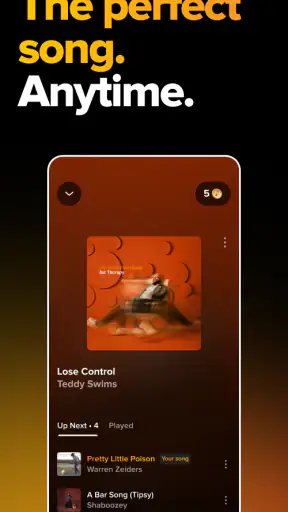
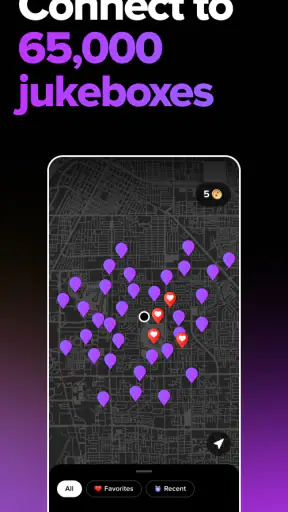
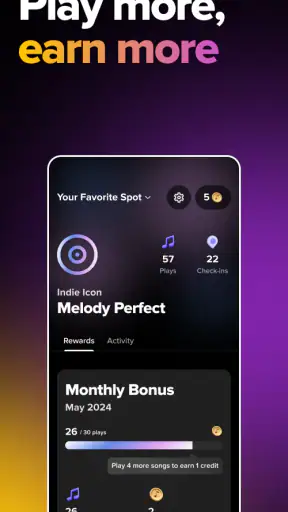
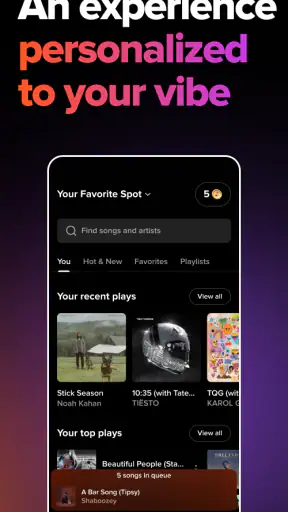
I found TouchTunes: Bar Jukebox most useful in the exact situation it is designed for: choosing music while I am already at a bar or another venue with a TouchTunes jukebox. Instead of walking up to the machine and tapping through its screen, I can browse from my phone, select a song, and send it to the jukebox. That simple change makes the experience feel more personal and less dependent on standing beside a crowded machine.
This is a free Music & Audio app from TouchTunes Music Company, LLC, and it is aimed at people who want a direct way to control venue music. It is not a replacement for a normal streaming service, and that distinction matters. I would not install it expecting private listening, offline playlists, or control over any jukebox in any location. Its value appears when the venue supports the TouchTunes system and I want to participate in what everyone in the room is hearing.
The app has been around since Mar 1, 2011, and its current version is 4.18.0-260804.1. It is free to install, carries a Teen content rating, and works on operating systems from version 9 onward. Its 4.8 average from around 132 thousand ratings and more than 5 million installs suggest that the basic idea works well for a large audience, although a high rating does not remove the practical limits of a venue-based jukebox.
How clearly the app works when I am choosing music
Readability and navigation in a busy venue
My first impression is that the app makes more sense when I think of it as a remote control for a public jukebox rather than as a music library. The important task is usually quick: find a song, decide whether it fits the room, and send it to the venue’s queue. That focused purpose is easier to understand than a full streaming app with albums, podcasts, recommendations, downloads, and social features competing for attention.
That focus is especially helpful in a noisy bar. I can search on my own screen instead of trying to read the jukebox display from an angle or waiting for someone else to finish. I also avoid leaning over a machine that several people are using. For me, this is one of the strongest accessibility advantages: the phone moves the browsing task into a more familiar and controllable environment.
There is still a difference between being able to open the app and being able to use it comfortably. A phone screen can be easier to bring close, enlarge, or position than a public display, but the experience depends on the device and the user’s settings. I would adjust system text size, display zoom, brightness, and contrast before going out if reading small interface elements is difficult. Those changes can help, but they are general phone settings rather than a promise that every part of the app will respond perfectly.
Navigation also depends on context. At home, I can take my time learning where search and selection controls are. At a venue, I may be distracted by conversation, low light, glare, or people waiting behind me. I found that using a specific song or artist in mind is much easier than casually exploring. A short, prepared list of possible tracks reduces the amount of searching I need to do when the room is loud.
One useful habit is to search before approaching the jukebox area. I can keep the phone in a comfortable position, confirm that I have selected the intended version, and then submit it without blocking the physical machine. This is a small workflow change, but it matters for anyone who finds crowded spaces, standing, or rapid public interaction tiring.
What the phone changes for people with different abilities
Using a personal device can support people who have difficulty reaching a wall-mounted or freestanding jukebox, reading a display at a distance, or staying beside a machine while browsing. It also gives me the option to hold the screen at a better angle and use familiar touch gestures. For someone who communicates more comfortably through a phone than through a quick face-to-face exchange, selecting music independently can make the activity less stressful.
However, I would not describe the app as automatically accessible for everyone. Touch controls still require accurate interaction, and the app remains dependent on a smartphone. Someone with limited hand movement may find small controls difficult, while a person using a screen reader, switch access, voice control, or magnification should test how well those tools work with the current interface before relying on it during a busy night out. The app’s purpose is clear, but purpose alone does not guarantee equal ease of use.
For users with hearing loss, the app can be useful because choosing a song does not require hearing spoken instructions from people nearby. It also reduces the need to identify a track from a noisy conversation. At the same time, the central result is still music playing in the venue, so the app cannot make the audio experience equally meaningful for every listener. Its strongest benefit in this situation is control and participation, not improved sound access.
For users sensitive to bright screens, flashing lights, or loud environments, the phone may be easier to manage than standing near the jukebox. I can lower brightness, use a preferred display mode, and step away after submitting a song. The venue itself remains the bigger variable. The app cannot control the lighting, volume, crowd density, or physical layout around the jukebox.
Using it in real situations rather than at home
A realistic example is a group meeting at a bar after work. Conversation is already competing with the music, the jukebox is surrounded by people, and I do not want to interrupt the group every time I have a song suggestion. With TouchTunes, I can search from my seat, choose something suitable, and let the group know what I added. That makes the app valuable for shared decisions, not just individual control.
Another scenario is a person who uses a wheelchair or has difficulty standing for long periods. If the venue’s jukebox is placed in a narrow or busy area, using the phone may avoid an unnecessary trip across the room. The important qualification is that the phone does not remove every physical barrier: the venue must still be reachable, the jukebox must support the service, and the user may need a way to identify the correct location or account context.
I also see a benefit for parents or guardians accompanying teenagers in a public venue where the app is appropriate to use. The Teen content rating means I would still consider the setting and the music choices rather than treating the app as automatically suitable for every family situation. The phone makes song selection more discreet, but it does not change the atmosphere or content of the venue.
For someone with anxiety around public machines, the app offers a calmer sequence: open the phone, search privately, review the choice, and submit. That is less socially demanding than standing at a shared touchscreen while strangers wait. I would still recommend checking the selection carefully, because speed and background noise can lead to choosing the wrong track or artist.
Where the inclusive experience still falls short
Dependence on the venue and the surrounding setup
The largest limitation is that this is not a universal remote for music systems. It only makes sense where a compatible TouchTunes jukebox is available. That means accessibility depends partly on the venue’s layout, the jukebox’s location, the strength of the phone connection, and whether the service is functioning at that moment. The app can improve access to the control process, but it cannot turn an inaccessible venue into an accessible one.
This also affects planning. I would not make it my only option for a special event unless I already knew the venue used TouchTunes and that I could comfortably connect and select music there. If the jukebox is hidden, positioned behind a barrier, or surrounded by a crowd, the phone may help with browsing but still leave me uncertain about whether the request reached the right machine.
People who expect a personal music experience should also choose a different kind of app. TouchTunes is designed around public playback, so it is not the right choice for listening privately through headphones, building an offline collection, or guaranteeing that a song will play immediately. A conventional streaming service is better for those needs because it is built around individual listening rather than a shared venue queue.
Motor, visual, and cognitive friction
Touch interaction can be tiring for users with tremors, reduced dexterity, or pain in the hands. Searching, choosing, and confirming may involve several precise actions, and a crowded environment increases the chance of a mistake. I would use the phone’s accessibility features, hold it with both hands if that is comfortable, and avoid trying to complete the process while walking.
Visual access is similarly dependent on the phone. A larger display may be easier than the jukebox screen, but a small phone can create the opposite problem. Glare from venue lighting, dim surroundings, and changing screen brightness can all affect readability. I found that preparing the display before entering the venue is more practical than trying to solve these issues after the music and conversation have already become distracting.
Cognitive load can rise when there are many similar song titles, artists with overlapping names, or several versions of a track. I would pause at the confirmation stage rather than tapping quickly. This is one of the most important practical tips: the app makes remote selection easier, but it also makes it easy to submit a choice without the physical jukebox immediately reminding me what I selected.
People who rely on voice interaction may appreciate being able to search through phone-level tools, but I would not assume that every action inside the app can be completed hands-free. Anyone who cannot comfortably use touch should test the complete process, including opening the app, finding the venue context, selecting a song, and confirming it. A partial workaround is not the same as a fully hands-free experience.
Social and sensory trade-offs
The app can reduce awkwardness, but it can also make music selection feel less social. A group gathered around the jukebox may enjoy browsing together, while a person using only the phone might miss that shared moment. I see this as a trade-off rather than a flaw. For someone who finds public interaction difficult, private selection may be liberating. For someone who enjoys the communal ritual, the physical machine can still be more fun.
There is also a question of fairness within a group. Because the app makes it easy to add songs from a seat, several people may submit choices without discussing the order or mood. In my experience, the best use is to agree on a few tracks first, then let one person submit them. That keeps the app from turning a shared playlist into a stream of disconnected requests.
Battery life and phone attention are practical concerns too. Browsing music while socializing means looking down at a screen, and that may be inconvenient for people who need to monitor children, mobility equipment, drinks, or companions. I would choose the songs in one short session rather than repeatedly checking the app throughout the evening.
Who should use it and who should skip it
I recommend it to people who regularly visit venues with TouchTunes jukeboxes, enjoy influencing the room’s music, or find a public jukebox difficult to approach. It is also a sensible option for groups that want to coordinate song choices without crowding around one screen. The free installation makes it easy to try when the right venue is already part of the plan.
I would skip it if I mainly want private listening, offline playback, a carefully managed personal library, or music control at home. A standard streaming app is more suitable for those goals. I would also avoid depending on it as an accessibility solution without testing it on my own phone and in the kind of venue where I intend to use it.
The developer, TouchTunes Music Company, LLC, has built an app with a narrow but understandable job. Its large user base and strong average rating show that this job resonates with many people, but the rating should not be read as evidence that every user will experience the same ease. The difference between a comfortable phone setup and a difficult one can come down to screen size, motor control, visual needs, and venue conditions.
My inclusive verdict
I like TouchTunes because it removes one very specific obstacle: having to stand at a public jukebox to browse and choose music. That can make participation easier for people with mobility limitations, social anxiety, hearing-related communication challenges, or simply a dislike of crowded machines. The app’s clearest strength is the way it shifts selection onto a personal screen that I can position and configure for myself.
Its inclusive value has boundaries. It does not guarantee that the venue is reachable, that the interface suits every assistive technology, or that the music itself will be accessible to every listener. Users with motor, visual, cognitive, or sensory needs should treat it as a potentially helpful tool, then test the complete workflow in realistic conditions. Preparing the phone, choosing songs before approaching the machine, and confirming each selection carefully make a noticeable difference.
Overall, I would recommend it as a practical companion for supported bars and venues, not as a general music player. If your goal is to take part in a shared jukebox experience while avoiding some of the physical and social friction around the machine, it is worth trying. If your goal is personal listening or guaranteed control in any location, another music app will serve you better.


